
Ship a Website in 10 Minutes. Free. Forever.
Last week a founder shipped their startup landing page in 11 minutes. No server bill. No DevOps. No node_modules folder eating 400MB of disk. I'm going to show you exactly how.

What you will have at the end: A live website on the global edge, auto-deploying on every GitHub push. The only thing that costs money is a custom domain — and that is optional.
The old way vs this way
You have probably done this before. It goes something like:
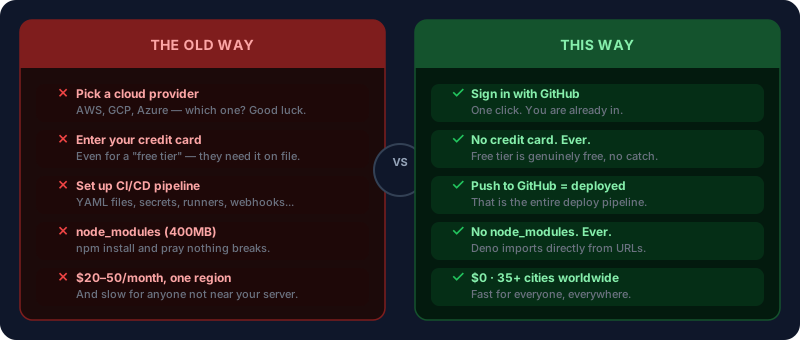
That diagram is not marketing. That is the actual difference.
What you need
Click any card above to sign up. That is the entire list.
Step 1 — Install Deno
curl -fsSL https://deno.land/install.sh | sh
On Windows:
irm https://deno.land/install.ps1 | iex
Verify it worked:
deno --version
# deno 2.x.x
If that prints a version number, you are done. That is genuinely all the setup there is — no separate package manager, no global config files, no PATH wrestling.
Step 2 — Build the site
Create a folder and three files. That is your entire project.
mkdir my-site && cd my-site
deno.json — your project config and import map:
{
  "tasks": {
    "dev": "deno run -A dev.ts",
    "start": "deno run -A main.ts"
  },
  "imports": {
    "@fresh/core": "jsr:@fresh/core@^2.0.0",
    "@fresh/core/dev": "jsr:@fresh/core@^2.0.0/dev",
    "fresh/internal": "jsr:@fresh/core@^2.0.0/internal",
    "fresh/internal-dev": "jsr:@fresh/core@^2.0.0/internal-dev",
    "preact": "npm:preact@^10.22.0",
    "preact/jsx-runtime": "npm:preact@^10.22.0/jsx-runtime",
    "preact/hooks": "npm:preact@^10.22.0/hooks"
  },
  "compilerOptions": {
    "jsx": "react-jsx",
    "jsxImportSource": "preact"
  }
}
main.ts — the entry point Deno Deploy will run:
import { App, staticFiles } from "@fresh/core";

export const app = new App()
  .use(staticFiles())
  .fsRoutes();

if (import.meta.main) {
  await app.listen();
}
dev.ts — for local development:
import { Builder } from "@fresh/core/dev";

const builder = new Builder();

if (Deno.args.includes("build")) {
  await builder.build(() => import("./main.ts"));
} else {
  await builder.listen(() => import("./main.ts"));
}
routes/index.tsx — your home page:
export default function Home() {
  return (
    <html>
      <head>
        <meta charset="utf-8" />
        <title>My Site</title>
      </head>
      <body style="font-family: sans-serif; max-width: 600px; margin: 80px auto; padding: 0 20px">
        <h1>Hello, world.</h1>
        <p>My site is live. This took 10 minutes.</p>
      </body>
    </html>
  );
}
Run it:
deno task dev
Open http://localhost:8000. Your site is running.
Notice what is missing: no
npm install, nowebpack.config.js, no.babelrc, no 47 packages to audit. Just files and a running server.
Step 3 — Push to GitHub
Create a new repository on GitHub — call it anything. Then:
git init
git add .
git commit -m "first commit"
git remote add origin https://github.com/yourusername/my-site.git
git push -u origin main
Two minutes. Your code is on GitHub.
Step 4 — Deploy in 3 clicks
- Go to dash.deno.com → sign in with GitHub
- New Project → select your repository
- Set entry point to
main.ts→ Deploy
Watch the logs for about 30 seconds. Then you will see:
✓ Deployment complete
https://my-site-abc123.deno.dev
Click that link.
What just happened: Your code is now running in Singapore, Frankfurt, São Paulo, and 32 other cities simultaneously. Every visitor gets served from the location closest to them. That used to require a Netflix-sized infrastructure team. You just did it in under 10 minutes.
From this point on — every git push to main redeploys automatically. No CI setup. No deploy scripts. No "works on my machine." Just push.
Step 5 — Add a blog in 5 minutes
Create posts/hello-world.md:
---
title: Hello World
date: "2026-03-30"
excerpt: My first post.
tags:
  - meta
---

This is my first post. My site runs on Deno Deploy and costs nothing.
Add utils/posts.ts to read your markdown files:
import { extract } from "jsr:@std/front-matter@^1.0.0/yaml";
import { join } from "jsr:@std/path@^1.0.0";
import { marked } from "npm:marked@^12.0.0";

const POSTS_DIR = new URL("../posts", import.meta.url).pathname;

export async function getAllPosts() {
  const posts = [];
  for await (const entry of Deno.readDir(POSTS_DIR)) {
    if (!entry.name.endsWith(".md")) continue;
    const slug = entry.name.replace(/\.md$/, "");
    const raw = await Deno.readTextFile(join(POSTS_DIR, entry.name));
    const { attrs } = extract(raw);
    posts.push({ slug, ...attrs });
  }
  return posts.sort((a, b) =>
    new Date(b.date).getTime() - new Date(a.date).getTime()
  );
}

export async function getPost(slug) {
  try {
    const raw = await Deno.readTextFile(join(POSTS_DIR, `${slug}.md`));
    const { attrs, body } = extract(raw);
    return { slug, html: await marked(body), ...attrs };
  } catch {
    return null;
  }
}
Add routes/blog/index.tsx:
import { page, type PageProps } from "@fresh/core";
import { getAllPosts } from "../../utils/posts.ts";

export async function handler() {
  return page({ posts: await getAllPosts() });
}

export default function BlogIndex({ data }: PageProps<{ posts: any[] }>) {
  return (
    <html>
      <head><title>Blog</title></head>
      <body style="font-family: sans-serif; max-width: 600px; margin: 80px auto; padding: 0 20px">
        <h1>Blog</h1>
        {data.posts.map((post) => (
          <div key={post.slug} style="margin-bottom: 2rem">
            <a href={`/blog/${post.slug}`} style="font-size: 1.25rem; font-weight: 600">
              {post.title}
            </a>
            <p style="color: #666">{post.excerpt}</p>
          </div>
        ))}
      </body>
    </html>
  );
}
Push. Your blog is live at /blog.
Writing a new post is as simple as creating a markdown file and pushing to GitHub. No CMS login. No database. No deploy button to remember to click.
Optional — Your own domain
The free tier gives you yourname.deno.dev. If you want yourname.com:
- Buy a domain — Hostinger starts at a few dollars a year
- Deno Deploy dashboard → your project → Domains → Add Domain
- Copy the DNS records Deno Deploy shows you
- Paste them into your Hostinger DNS panel
- Wait 10 minutes
Done. This is the only step that costs money. Everything else stays free.
Free tier limits: 100,000 requests/day, 100GB data transfer/month. For a new project that is essentially infinite.
Why this stack wins
You are not just getting free hosting. You are getting a workflow that removes every source of friction between an idea and a live URL.
- No server to patch. Deno Deploy manages infrastructure.
- No database to back up. Blog posts are markdown files in your repo.
- No build pipeline to maintain. Push = deploy.
- No vendor lock-in. Your code is plain TypeScript files on GitHub. Leave any time.
- No bill shock. You will know exactly when you need to upgrade — when you outgrow the free tier, which takes a while.
What to do next
Add pages by creating files in routes/. Add posts by creating .md files in posts/. Style with Tailwind by dropping in a <script src="https://cdn.tailwindcss.com"> tag.
That is the whole system. There is nothing hidden.
You now ship the same way the fastest teams in the world do. The only difference between you and them is what you build next.
Built with Fresh · Hosted on Deno Deploy · This post lives at blog.bytescrafts.com